 Pigeon Post
Source code
Pigeon Post
Source code
New mail,
at a glance.
Unread counts on the toolbar and desktop notifications for every Gmail account you're signed in to in Chrome. No extra login, no OAuth, no server.
Free and open source. Available in 8 languages.
You decide what matters
Set each inbox, inbox tab, Starred, Important or any of your labels to one of three levels. Try it here: the icon and the notification follow your choices, just like the live preview on the settings page.
- OffNot checked
- CountAdded to the unread count on the toolbar icon
- NotifyCounted, plus a desktop notification
What you'll see
 4
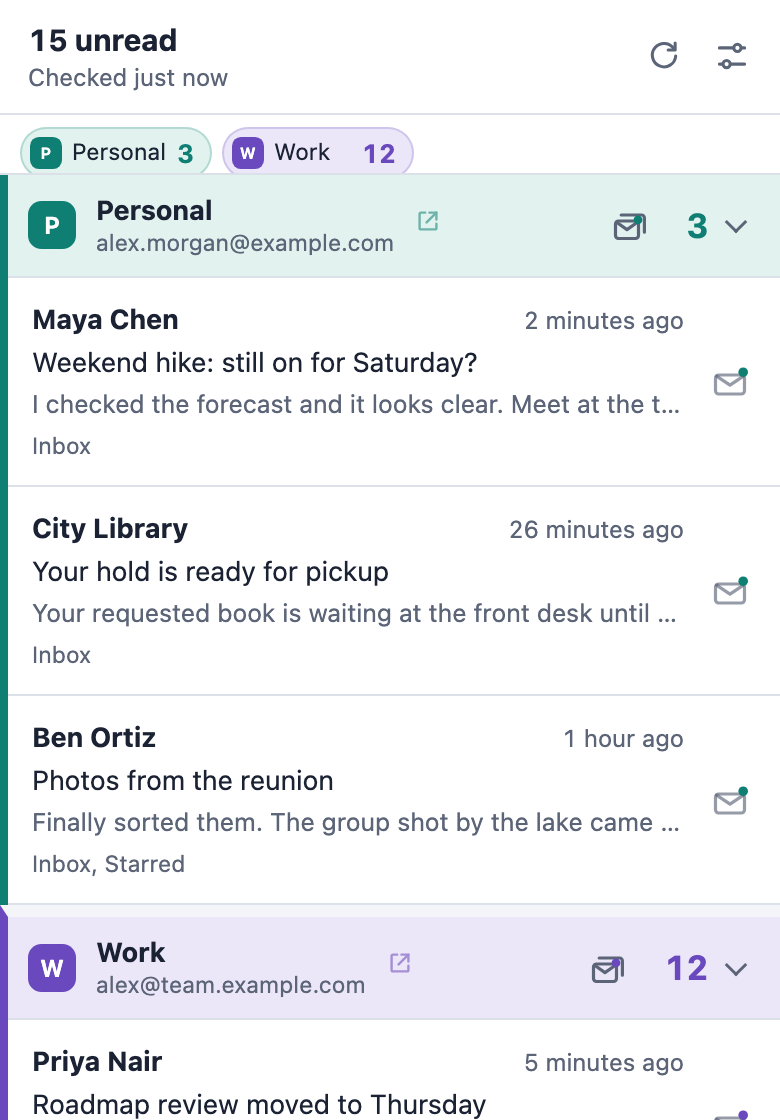
4Several mailboxes, clearly apart
Every Gmail account you're signed in to in Chrome is found automatically and gets its own section in the list.
A name, a color and a sound for each
Tell mailboxes apart at a glance, and by ear when a notification arrives.
One total, or one number per mailbox
Show 15 on the icon, or 3/12 to see each mailbox separately.
Your labels, picked from a list
Labels are read from Gmail itself, so you never have to type a label name.
Act without opening Gmail
Deal with new mail from wherever you are in Chrome.
Mark as read from the notification
One click on the notification, and the message is marked as read in Gmail too.
Clear a whole mailbox
Mark every unread message in a mailbox as read in one step, after a quick confirmation.
Open the right message
Clicking a message opens it in the right Gmail account, reusing an open Gmail tab.
Private by design
Pigeon Post uses the Gmail session you already have in Chrome. There's no account to create and nothing extra to sign in to.
Talks only to Google
It connects to Gmail, plus Google's image server if you choose to show your account photo. No server, no analytics, no ads and no tracking. Nothing is ever sent to the developer.
Mail stays in memory
Senders, subjects and snippets of unread mail are kept in memory only and cleared when Chrome closes.
Reads only what it needs
It reads Gmail's unread-mail feed, never full messages, and changes nothing except marking mail as read when you ask.
Open source
Every line is on GitHub under the GPL-3.0 license, so you can check exactly what it does.
Get started in a minute
Add it to Chrome
Install Pigeon Post from the Chrome Web Store.
Stay signed in to Gmail
Every Gmail account you're signed in to in Chrome is found on its own.
Choose what matters
The settings page opens right away. Pick what counts and what notifies you.

Keep Pigeon Post free
Pigeon Post has no ads, no tracking and no paid version. If it saves you time, a boba or a small tip helps me keep it working through every Gmail and Chrome change, and build what comes next.
Boba is paid by card. No PayPal account needed.